Showing posts with label kess v2. Show all posts

2023/03/15

Kess V2 Write BMW EDC17CP02 via OBD or Boot

Is it safe to read and write BMW EDC17CP02 ECU with kess v2 clone over OBD?


This ECU sometimes have OTP. You can write it in OBDII but the car will not start after. write ori back and all is okay again. So do it in boot mode. Open unit read file and write via OBD direct connection unit on table.  Be careful to not overwrite eeprom, will brick ecu.

You can write this with Fgtech, if the ecu have protection, you can write ori back again and car start. With kess, you can’t write ori back and need full tricore.


Read by boot mode, next remove TPROT manually, you can write any update your job by OBD2 or use K-tag and patch ecu and than read/write by obd.


But this instruction will be relevant not only for those who have attached the EDC17cp02 via the OBDII connector, but also for other units with Infineon-Tricore processors.
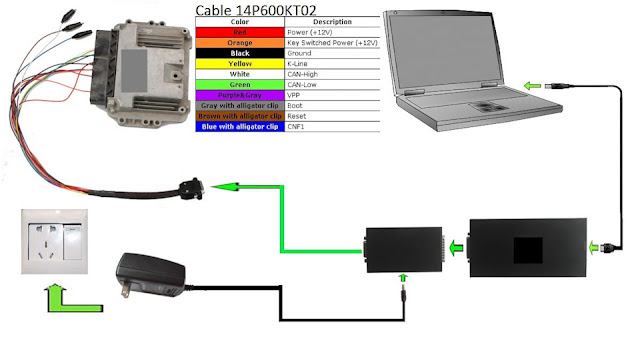
To read the unit, we need: KESS v2, Infineon-Tricore module 14P600BTLR (black box from the kit, with a socket for connecting the power adapter), a 12V power adapter, and a cable for connecting the unit on the table 14p600kt02.

1-Remove the ECU from the car, unscrew the back cover and solder to the BOOT pin Fig.1.

Kess V2 Write BMW EDC17CP02 via OBD or Boot 1
 

The remaining wires are connected according to Fig.2.

Kess V2 Write BMW EDC17CP02 via OBD or Boot 2


2-Run the KSUITE program, then: PROTOCOLS>>BOOTLOADE TRICORE>>BOSCH EDC17 BMW>>OK, in the next window select BOSCH EDC17 CP02 BMW (P154)>>OK. In the window that opens, select READING>>SELECT.- save the calibration

3-Open in a HEX editor (i.e HxD) full flash firmware, and the calibration that we merged through BOOT.

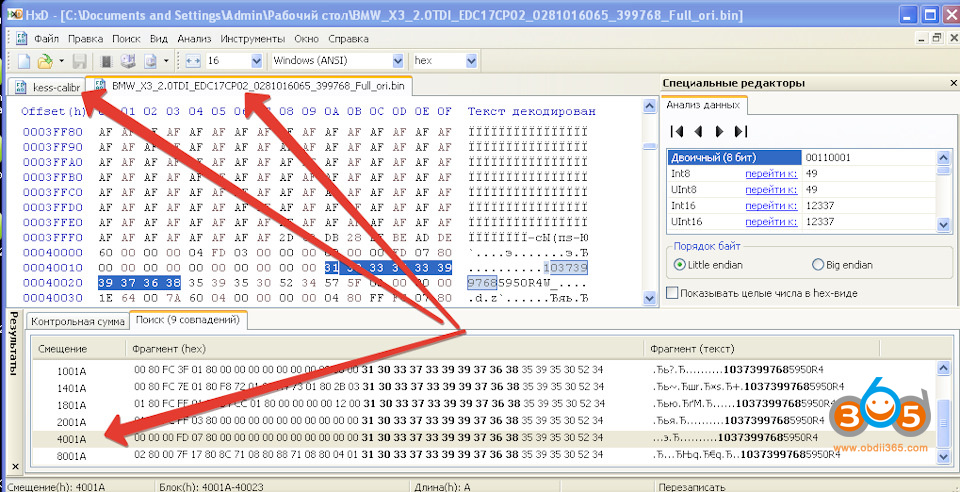
4-Check the location of the identifiers: click SEARCH>> FIND>> put in the ECU ID numbers in the search, in my case “1037399768”>> DIRECTION>> EVERYWHERE>> OK Fig.3.

Kess V2 Write BMW EDC17CP02 via OBD or Boot 3

3.- check the addresses in the file we downloaded and FULL.ori (.ori- as the original stock firmware is designated) – the addresses match, so everything is OK.

5- Check the size of the files:
– FULL.ori 1 540 096 bytes
– read calibration 1 572 864 bytes

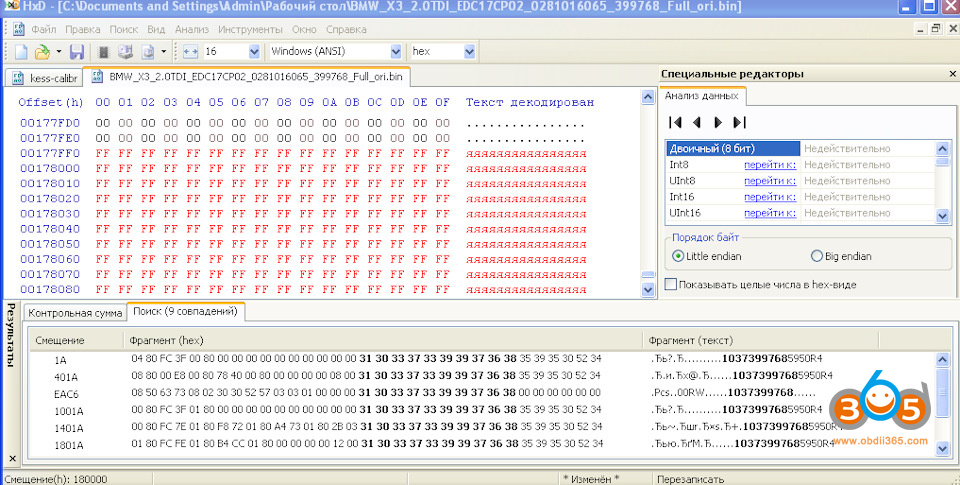
6- Since the file sizes are different, we start looking for the missing lines, briefly compare the structure of the firmware, focusing mainly on the location of the identifiers. Since no error was found, we copy the last lines from the file we read to FULL.ori Fig.4.

Kess V2 Write BMW EDC17CP02 via OBD or Boot 4

7-Run the KSUITE program, then: PROTOCOLS>>BOOTLOADE TRICORE>>BOSCH EDC17 BMW>>OK, in the next window select BOSCH EDC17 CP02 BMW (P154)>>OK. In the window that opens, select WRITING>>SELECT>>path to corrected file.

8- Verification: read BACKUP. Run the KSUITE program, then: PROTOCOLS>>BOOTLOADE TRICORE>>BOSCH EDC17 BMW>>OK, in the next window select BOSCH EDC17 CP02 BMW (P154)>>OK. In the window that opens, select TOOL>>SELECT>>BACKUP READ.If at the end of the reading, there will be no checksum error, so everything is done correctly.

2023/03/14

Kess V2 Clone Mercedes SIM4LKE

I get it working! ECU cloned & car starting!

I confirm solution with kess working without problem .

Protocol: SIEMENS5WY1 SIMTEC76 29F800

Kess v2 in boot mode & boot pin.

End I used the gray wire with the crock connector for the 100ohm resistor . 

Kess V2 Clone Mercedes SIM4LKE 1

Kess V2 Clone Mercedes SIM4LKE 2

Kess V2 Clone Mercedes SIM4LKE 3

Kess V2 Clone Mercedes SIM4LKE 4


2022/08/17

Read Peugeot 406 Sagem 2000 ECU with Kess V2

 A Peugeot 406 1.8 with Sagem 2000 ECU, from the moment of purchase, error P0136 constantly hung in memory, which indicates a problem with the second lambda.

It was decided to mechanically cut out the catalyst, programmatically remove the second lambda, if possible, send off the USR and add "horses", since the stock 116 hp. Vadim seems small.

We find the location of the engine control unit under the hood, remove it and go to open it. Open ECU and read by kess v2 or mpps in boot,

Read Peugeot 406 Sagem 2000 ECU with Kess V2 1

Location of the Sagem 2000 unit in the Peugeot 406

Read Peugeot 406 Sagem 2000 ECU with Kess V2 2

From the factory, SAGEM 2000 control units were installed on the Peugeot 1.8 EW7J4 engine.

Read Peugeot 406 Sagem 2000 ECU with Kess V2 3

SAGEM 2000-2A ECU


The only disadvantage of these ECUs is that the boards are completely filled with compound and getting to the necessary nickels and elements (eeprom 95080, flash 29F200) is a painstaking task and requires "smooth hands". But, as they say: "the eyes are afraid, but the hands are doing."

Read Peugeot 406 Sagem 2000 ECU with Kess V2 4

Read Peugeot 406 Sagem 2000 ECU with Kess V2 5

The main task is to get to the Boot-pin, which is located near the Infineon SAK-C167CR-LM processor.

Read Peugeot 406 Sagem 2000 ECU with Kess V2 6

Sagem 2000-2a Boot pin


Connect the ECU according to the following pinout

Read Peugeot 406 Sagem 2000 ECU with Kess V2 7

Peugeot Citroen PSA Sagem 2000-2a pinout


You can read this ECU with two devices just in case: Kess v2 and MPPS 18. I compared the firmware read by different devices - they differ slightly in the boot part, but the calibration area is identical. For editing, I took as a basis the firmware read by Kess.

Read Peugeot 406 Sagem 2000 ECU with Kess V2 8

Sagem 2000 Kess

Read Peugeot 406 Sagem 2000 ECU with Kess V2 9

Sagem 2000 MPPS


The process of uploading the modified firmware is similar to the process of reading. After the firmware, we assemble the ECU, seal the exposed areas with a sealant so that moisture does not get in and nothing oxidizes.

Enjoy.

2022/07/19

Pinout of DB15 Boot Cable for Kess v2 and KTag

In this article, we will talk about the pinout of the DB15 cable for working in BOOT, which is included in the KTag ECU Master and KESS V2 Master flashers. In some cases, the question arises of the lack of communication with the ECU when connected to BOOT and the reason for this is the incorrect pinout of the DB15 cable. 


You can buy a high-quality KESS V2 with the necessary refinement and a proven pinout of the DB15 cable for working in BOOT online or make your own cable.  

Please note that externally the DB15 cable from K-Tag ECU Master fully corresponds to the DB15 cable from KESS V2 Master, however, they are not interchangeable, as they have different pinouts. That is, the DB15 cable from KESS V2 Master will not fit the K-Tag ECU Master and vice versa.

To check your BOOT cable, you need to disassemble it and compare the pinout with the following image. Analyzing this image, you can see that the differences relate to the brown and green pins, as well as yellow and purple.

this is the correct pinout for both tools.

Pinout of DB15 Boot Cable for Kess v2 and KTag 1

beside this, we all know that a CAN BUS system must have 120 ohm on both ends.

so, if I measure between can bus pins ( 7 high – white wire / 15 low – green wire) I have around 110 ohm on both tools.

this tells me that a single wiring scheme is used in both tools and the correct wiring and numbering is this:

Pinout of DB15 Boot Cable for Kess v2 and KTag 2

Pinout of DB15 Boot Cable for Kess v2 and KTag 3

We also give the color assignment of the DB15 cable pins:
– GREEN – CAN L;
– ORANGE (2 pcs) – VKEY (Key Switched Power (12V);
– YELLOW – K LINE;
– RED (2 pcs) – Power VECU;
– BLACK (2 pcs) – GND;
– PURPLE – VPP;
– WHITE – CAN H;
– BROWN – RESET;
– GRAY – BOOT;
– BLUE – CNF1.

Pinout of DB15 Boot Cable for Kess v2 and KTag 4

Best value kess v2 and ktag bundle 

2022/06/14

Kess V3 vs Kess V2 vs Autotuner

 The Alientech Kess v2, ktag, the new Kess V3, Dimport, Autotuner and kess v2/ktag clone which one is better? Should you upgrade?


Part I: Genuine Alientech Kess V3 vs Genuine Kess V2/Ktag

We’re going to take a look at them and then you’re going to decide. The kess v2 has been seen as the go-to tuning tool for the latest 10 years. A really big staple of the tuners library of tools and

indeed so has the ktag for those looking to do bench and boot tuning, so this new tool really has got to live up to some things.

What are the differences so what is it that brings makes the kess v3 so much better than the kess v2?


1.The most obvious difference is that these two tools ktag and the kess v2 are now incorporated into one single tool. Kess v3 allows you to do bench, boot and obd tuning all from one device.

Huge savings on hardware and of course for subscription licenses.  You no longer need to license two tools it’s just the one.


2. Kess v3 offers faster ecu remapping and tuning.  The kess v3 has at its heart one of the fastest processors in the industry creating faster checksum calculations. The processing power of the ks3 is so much faster than the kess v2. In fact it’s been proven to be at least 7 times faster than its predecessor.


3. There is also no need for quite as many wires the kess v3 while it has fewer unique wires than the kess v2. Those wires work harder connecting to just as many if not more ecu’s than the kessv2 did and for bench and boot tuning


4. Bespoke protocol configuration

Unlike the Kess V2 and K-Tag, there is now more choice in protocol and software activations with the Kess3. Motorbikes have now been separated from cars. So you are not having to purchase bikes if you don’t want them. And for Boot / Bench tuning you can now choose activation by vehicle type. I.e. Cars / Trucks, Marine etc. Unlike the K-Tag which was divided by ECU type. This now makes it much easier to understand, select and pay for just the vehicles you are interested in tuning.


5. The new Kess3 runs on all new software. No longer using K-Suite. The new software is simply called Alientech Suite. It’s much faster to use, and much easier to navigate. Making the whole tuning process surprisingly quicker and easier.

Kess V3 vs Kess V2


Part II: Kess V3 vs Autotuner


Both of them being the market leaders across Europe and some say the world.

they’ve both got something to offer but who knows which one you should have?

We’re going to find out all the ins and outs of both of these tools and then we’ll help you make a decision


Kess v2 have been the market leaders for quite some time and with age somes experience and a depth of knowledge.

The largest application list of any tool on the market and not just newer ones the application list goes all the way back to 1999. So a tool like this will allow you to tune not just modern cars but older ones as well. Kess v3 also has a processor that is saied to be 7 times quicker than its predecessor and arguably one of the fastest of any tuning tool on the market.

but perhaps the most important factor is the support that’s offered by alien tech for that matter.

Auto tuner definitely seen as one of the new kids on the block having only been released in 2019 it became very popular with tuners around the world initially at least because of

its ability to access some bmw and mercedes through obd tuning a feature that wasn’t available on many other devices.

Autotuner also has no yearly license fees reducing the running costs for you and just like the kess v3 it’s an all-in-one tuning tool giving you boot bench and obd all in the same device

reducing your running costs.  auto tuner is also fast very fast and as we know time is money so as one of the fastest tuning tools on the market autotuner can help you get through more customers meaning more money in your pocket.

Is there a winner though between the kess v3 and the auto tuner?

The autotuner is fast, vert fast and there is no yealy license although some masters would say that the api charge doesn’t really work for them.

The kess v3 has great coverage and a big support network but you do have that yearly charge although there’s no charge for api.

Many tuners would say though that the huge amount of coverage and the big support network more than makes up for that yearly license fee in truth.

it’s all about preference but most professional tuners will have access to more than one tuning tool to give you the greatest chance of tuning whatever vehicle you’re faced with no one tool is

all-encompassing so having access to more than one gives you the greatest chance of tuning whatever vehicle is in front of you.

kess v3 vs autotuner

Part III: Kess V3 vs Dimsport

The dimsport trasdata remapping tool is the device used for bench/boot tuning. This can be service mode or boot mode tuning directly to the ECU.
Dimsport connection is made simpler by using additional probes and adapters.

Both are good stable reliable tunings tools. The tool coverage and use was very similar.

Master tuners have tended to like the fact that the Alientech tools read an open file.
This in turn means the tuner can use any remapping/editing software they want.
On the other hand, the dimsport master tools for very many years could only be used with the Race2000 software tuning software.
So the choice was very limited and even the type of tuning files that could be written was restricted.

The Dimsport set of tuning tools are still excellent, but with the new kess v3, the car is now set to a whole new level.
The kess 3 speed and also that it is both OBD and boot tuning in one tool, meaning just one subscription package is simply revolutionary.

kess v2 vs dimsport


Part IV:

Kess v2 original vs Kess V2 clone

http://blog.obdii365.com/2017/11/03/kess-v2-slave-or-master-original-or-clone/


Part V:

Kess v2 vs PCMTuner

http://blog.obdii365.com/2022/03/22/kess-v2-clone-vs-pcmtuner/


2022/06/06

Kess V2 Clone MB SIM4LKE Success

I get it working! ECU cloned & car starting!

Protocol: SIEMENS5WY1 SIMTEC76 29F800

Kess v2 5.017 red pcb clone in boot mode & boot pin.

Info about pinout. 

Kess V2 Clone MB SIM4LKE 1

Kess V2 Clone MB SIM4LKE 2

Kess V2 Clone MB SIM4LKE 3

Kess V2 Clone MB SIM4LKE 4


2022/04/10

Free Download EGPT V1.4 Pinout Tool for ECU Connections

Obdii365.com here shared the EGPT V1.4 Pinout tool ecu schematics pinout software program for Bosch ECU egpt connections for free.


The wiring diagram pinout tool is useful for Bosch ECU reading and writing by lots of programmers, kess v2, ktag, pcmtuner etc.

Free Download EGPT V1.4 Pinout Tool for Bosch ECU EGPT Connections

https://mega.nz/file/tM8GBbzC#3so2nOB46WOYr0ZypSOIKMnOXwqIF4Hrkh5TJMXgnYc

Free Download EGPT V1.4 Pinout Tool for ECU Connections 1

Download, extract and run


The EGPT V1.4 allows searching by car brand and ECU

ECU wiring diagram, schematics for cars and additional information for Bosch EDC16, EDC17, EDC15, ME71, ME75, MED7 etc.

Free Download EGPT V1.4 Pinout Tool for ECU Connections 2

Free Download EGPT V1.4 Pinout Tool for ECU Connections 3

Free Download EGPT V1.4 Pinout Tool for ECU Connections 4

Free Download EGPT V1.4 Pinout Tool for ECU Connections 5

ECU List:

E86 TC1796
E86C TC1797
EDC17C06
EDC17C08
EDC17C010
EDC17C11
EDC17C18
EDC17C19
EDC17C41
EDC17C42
EDC17C45
EDC17C47
EDC17C49
EDC17C53
EDC17C54
EDC17C55
EDC17C56
EDC17C57
EDC17C59
EDC17C60
EDC17C63
EDC17C64
EDC17C66
EDC17C69
EDC17C70
EDC17C73
EDC17C74
EDC17C76
EDC17C79
EDC17C81
EDC17C84
EDC17CP01
EDC17CP02
EDC17CP04
EDC17CP05_TC1796
EDC17CP05_TC1797
EDC17CP06
EDC17CP07
EDC17CP09
EDC17CP10
EDC17CP11
EDC17CP14
EDC17CP19
EDC17CP20
EDC17CP22
EDC17CP24
EDC17CP27
EDC17CP37
EDC17CP42
EDC17CP44
EDC17CP45
EDC17CP46
EDC17CP47
EDC17CP48
EDC17CP49
EDC17CP50
EDC17CP52
EDC17CP54
EDC17CP55
EDC17CP57
EDC17CP58
EDC17CP62
EDC17CP65
EDC17CP68
EDC17CV41
EDC17CV42
EDC17CV42 V2.00
EDC17CV42 V2.01
EDC17CV52
EDC17CV44
EDC17CV54
EDC17U01
EDC17U05
MED17.1.1
MED17.2.1
MED17.2.4.2
MED17.2.4
MED17.2
MED17.3.0
MED17.4.5
MED17.5.20
MED17.5.24
MED17.5.26
MED17.5.6
MED17.7.8
MED17.7
MED17.8.3
MED17.8.33
MED17.8.5
MED17.8.7
MED17.9.7
MED17.9.11
MED17.9.20
MED17.9.21
MED17.9.23
MED17.9.51
MED17.9.52
MED17.9.53
MED17.9.61
MED17.9.64
MED17.9.6
MED17.9.71
MED17.9.74
MED17.0.1
MED17.0
MED17.1.10
MED17.1.11
MED17.1.1
MED17.1.21
MED17.1.27
MED17.1.61
MED17.1.6
MED17.2
MED17.3.1
MED17.3.3
MED17.3.4
MED17.3.5
MED17.3
MED17.4.2
MED17.4.4
MED17.4
MED17.5.1
MED17.5.20
MED17.5.21
MED17.5.25
MED17.5.2
MED17.5.5
MED17.5.6
MED17.5
MED17.7.2
MED17.7.3.1
MED17.3
MED17.5
MED17.7
MED17.8.31
MED17.8.32
MED17.9.3
MED17.9.63
MED17.9.7
MED17.9.8
MED17.9.9
MED17.9
MEDC17.9
MEDC17.0
MEDV172_TC1766
MEDV172_TC1796
MEDV17.4
MEG17.9.12 KEFICO
MEG17.9.13 KEFICO
MEG17.9.21
MEV17.2
MEV17.4.2
MEV17.4.6
MEV17.4
MEVD17.2.2
MEVD17.2.3
MEVD17.2.4
MEVD17.2.8
MEVD17.2.9
MEVD17.2
MEVD17.4.4
MEVD17.4
MEVD17.8.4
MEVD17
MEVD172G

http://blog.obdii365.com/2022/04/10/egpt-v1-4-pinout-tool-for-bosch-ecu-connections/

2022/03/08

Kess v2 and KTag Pinout of DB15 Cable 14P600KT02

 In this article, we will talk about the pinout of the DB15 cable for working in BOOT, which is included in the K-Tag ECU Master and KESS V2 Master flashers. In some cases, the question arises of the lack of communication with the ECU when connected to BOOT and the reason for this is the incorrect pinout of the DB15 cable. You can buy a high-quality KESS V2 with the necessary refinement and a proven pinout of the DB15 cable for working in BOOT in the www.obdii365.com online store. The online store also offers to buy a high-quality K-Tag with the necessary modifications for 100% ECU support via K-line and CAN.
Please note that externally the DB15 cable from K-Tag ECU Master fully corresponds to the DB15 cable from KESS V2 Master, however, they are not interchangeable, as they have different pinouts. That is, the DB15 cable from KESS V2 Master will not fit the K-Tag ECU Master and vice versa.
To check your BOOT cable, you need to disassemble it and compare the pinout with the following image. Analyzing this image, you can see that the differences relate to the brown and green pins, as well as yellow and purple.

Kess v2 and K-Tag Pinout of DB15 Cable 14P600KT02 1
We also give the color assignment of the DB15 cable pins:
- GREEN - CAN L;
- ORANGE (2 pcs) - VKEY;
- YELLOW - K LINE;
- RED (2 pcs) - VECU;
- BLACK (2 pcs) - GND;
- PURPLE - VPP;
- WHITE - CAN H;
- BROWN - RESET;
- GRAY - BOOT;
- BLUE - CNF1.
Kess v2 and K-Tag Pinout of DB15 Cable 14P600KT02 2