Showing posts with label kess v2 clone. Show all posts

2021/07/05

How to Unlock a PCR2.1 with Kess V2 on Bench?

Problem:  

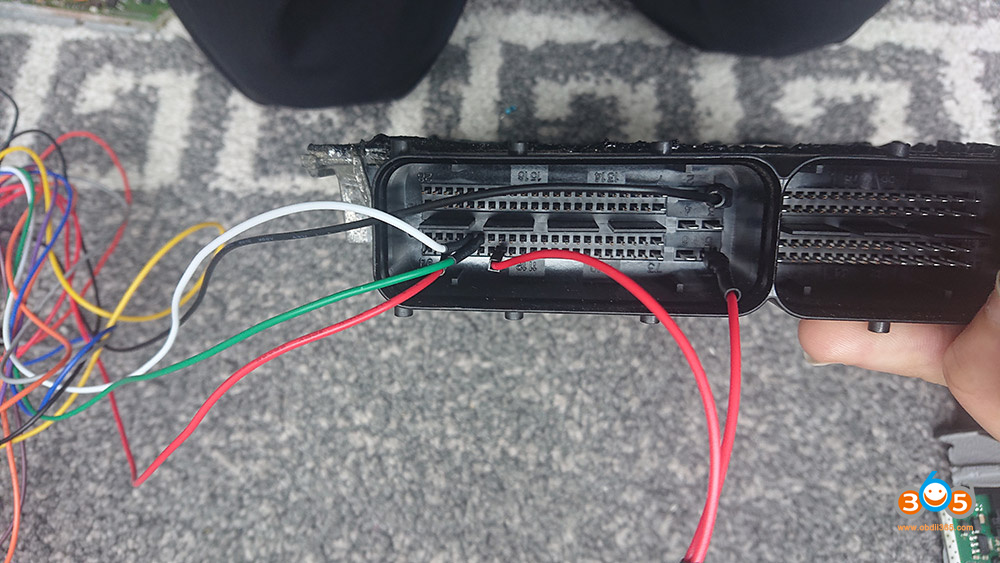
I try more times with KESS v2 clone to unlock a pcr2.1 eeprom in bench, I get an error with KESS when I select READING EEPROM and after display “start communication”.

The wires are OK and voltage is OK, KESS works fine.


These are the images of my connection:

kess-v2-clone-unlock-pcr21-1

kess-v2-clone-unlock-pcr21-2

kess-v2-clone-unlock-pcr21-3

Experience for sharing and how-to guide:

Your connection looks ok…. this ecu need a big good one. an adapter +12V/3A works fine with Ktagand Kess.

then desolder eeprom and read it with programmer, you can find here the tool to unlock the prc2.1 eeprom, but beware, dont play with lock-unlock with this ecu, if you put again in car, can you get ID with kess? it is eeprom locked?


kess v2 (clone) should unlock eeprom fine, follow the kess instruction. I cant with ktag. with kess no problem.


a couple of months ago, I had try to unlock a prc2.1 in bench with ktag, it reads fine the eeprom but it couldn’t write it….then I used the kess, with kess could read unlock and write back the eeprom, and after I make DPF & EGR off by obd….. no problem….for curiosity, i tryed to unlock the original eeprom with program for pcr unlock, after i compare the two modified eeproms (from kess and from program) and is was identical….


if you follow exactly the instructions from ksuite manual, and you can’t connect with ecu, then maybe you must reinstall the ksuite program with some windows add on librarys, or your tool is not good and need to rework it….


Hope it helps!


https://www.obdii365.com/wholesale/kess-v2-v5017-online-version-se137-c3.html

2020/02/20

How to Install Ksuite V2.53 Software for Kess V2 5.017

Latest Ksuite V2.53 software is verified working with Kess v2 firmware V5.017 online version. Software can be download here for free.

What’s new in Kess V2 v2.53?
Fixed bugs and added more car models.

Free Download Kess v2 ksuite v2.53 software
Password: i4cwgr (tested 100%)

Mega link (not tested)

Advantages of v2.53 version over v2.23:
– additional 300 unlocked protocols  that you can read directly through OBD  which means more supported cars up to 2017 MY;
– Bug fixes with checksum;
– Various other bug fixes;
– No token limits;
– Working online with internet connection with no problems;
– No cracks and keygens.
V2.53 Only works for Red /Green KESS V5.017 China or EU clone, does not support KTAG V7.020 / KESS V4.036
kess-v2-v253
Software Language: English/ German/ Spanish/ Italian/ Portuguese/ French
kess-v2-v253-language
How to Install Kess V2 V2.53 Software on Windows 7?
Operating systems: Windows XPWindows 7 etc
It is very easy to install. Does not require activation.
Open software CD
install-kess-v2-v253-sw-1
install-kess-v2-v253-sw-2

Copy and paste then extract Ksuite253.zip to disk C://
Open Ksuite253 folder on C://
install-kess-v2-v253-sw-3

Send Ksuite to desktop (create shortcut)
install-kess-v2-v253-sw-4
Open Driver folder and open vcredist_v86 to install Microsoft Virsual C++ 2005
install-kess-v2-v253-sw-5

Then open Driver_USBDEVICEDRV
Select driver language
install-kess-v2-v253-sw-6
install-kess-v2-v253-sw-7

Press Install to install driver until succeed
install-kess-v2-v253-sw-8

Connect kess v2 with computer. Windows will detect and install USB device.
install-kess-v2-v253-sw-9

You can check USB device on Computer Device Manager as well.
install-kess-v2-v253-sw-10
Run Ksuite shortcut on desktop
install-kess-v2-v253-sw-11

Check device info
Select Ksuite language
Software is ready to use.
For example, read BMW E91 SIEMENS MSD80 ECU
install-kess-v2-v253-sw-12

install-kess-v2-v253-sw-13

install-kess-v2-v253-sw-14

install-kess-v2-v253-sw-15
Then save data.

2019/07/19

Read BMW M5 E60 EDC17 with Kess v2 or Galletto v54?

Purpose & problem:
I have been remapping a 2006 BMW M5 E60.
I have heard the MPPS is not suitable for this so decided to buy a better tool.
Not sure if I should go for a Galletto v54 or the Kess V2.
Any advice would be great, ideally I would like to get the one that covers most cars via OBD.

Advice from users:
  1. Kess V2 is better solution.

  1. EDC17 safer to do on the frame, and some only.
    KESS and GALLETTO it is a good.
    If you buy a fake you never know what to do, and if at all something impute.

  1. Galletto works well for boot mode tricore

  1. For me both tools are doing a good JOB – Kess is china clone but i have an original one aswell. just need to update is to Master – because at the moment is SLAVE.
    FG Galleto V54 is Euro Clone and until now it never ever let me down . Anyway… what i figure it out is that the tools are good and work good but the laptop configuration is quite important.
    I use panasonic toughbook CF 19 and CF 52. – Never had a single problem with both of them .

  1. Buy a good galletto clone “EU” and no problems, very stable.

6.The fg have no cs correction in edc17 kess have .
Kess is better tool for no w.

  1. the kess is more better than fgtech mpps etc

  1. On MED17 with KESS can’t do full read. File is somehow encrypted. With Galletto is fine.

  1. My KESS is reworked and work great as original. I just say if I do full read (backup) the file is encrypted.

  1. Galletto works well with edc17,
    chinese kess no!

  1. Galletto is fine

  1. Galletto working fine

  1. GALLETTO works well in boot mode tricode

  1. I use both, Kess v2 clone + Galletto v54 clone. But i prefer v 54 only because user fredliness and good working stability, no chance to suspend writing file or something else. Kess little bit fussy, and to much moronresistant and used only if V54 will not handle it but in plus a lot better for gasoline engines. V54 in 80% still needs rework after buying but after that works perfect

  1. Buy both they are cheap enough get them reworked and then you have two good tools

  1. Earlier Galetto didn’t support MSS65 K-line ( E6x V10 Mpower ) . It can only read by CAN which is only LCI E6x . Not sure about kess and the latest Galletto version . Someone can double check please . Some chinese says kess is not working good with K-line .

  1. i think it’s better to have boot clone tools they works on many units, about this ecu i think fg is the Best

  1. Both of them have its pros and cons, it’s up to you to make decision.

  1. I like like KessV2 is Safe,to work with them.

  1. EU kess only sold by resellers of chinese clones…..do the maths
    buy both kess v2 and galletto v54 chinese clone tools, have a play, decide which you like best software wise
    have it reworked, job done
    galletto is compatible with more cars IMO kess is more user friendly

  1. Galletto working ok w/ sirius 32

2018/11/06

Fiat Ducato III Delete DPF and EGR value with Kess V2

Today flashing the engine control unit on the Fiat Ducato III 2013Y 2.3L MT EDC16C39. 
It was necessary to turn off the EGR valve (it will shut up, a lot of soot in the intake manifold), DPF diesel particulate filter (to be cut), and of course, a fine tuning by itself) 
We will need the KESS V2 Master programmer clone or origianl.

(Disclaimer: The tutorial was translated from Russian. You are at your risk. Click to enlarge all images)

Go. 
Launch KSuite :

kessv-2-fiat-ducato-delete-dpf-egr-1
Choose a Fiat Ducato with the specified EDC16c39 control unit :
kessv-2-fiat-ducato-delete-dpf-egr-2
ECU identification:
kessv-2-fiat-ducato-delete-dpf-egr-3
HW: 0281018924 
SW: 103752158 
Spare: 55244353 
Now we will read the calibrations, press reading:

kessv-2-fiat-ducato-delete-dpf-egr-4
Almost half read:
kessv-2-fiat-ducato-delete-dpf-egr-5
Almost everything was considered:
kessv-2-fiat-ducato-delete-dpf-egr-6
Turn off the ignition:
kessv-2-fiat-ducato-delete-dpf-egr-7
Calibrations were counted as 15min, the correct size was 2Mb:
kessv-2-fiat-ducato-delete-dpf-egr-8
The resulting file 0281018924_1037521589_55244353.bin is sent to a verified calibrator, we pay as much as required, and we get the answer to the correct modified file for our tasks. 
Now, in the Ksuite program, select and write the new file:
kessv-2-fiat-ducato-delete-dpf-egr-9
Almost half signed up:
kessv-2-fiat-ducato-delete-dpf-egr-10
Almost everything is recorded:
kessv-2-fiat-ducato-delete-dpf-egr-11
Calibrations were recorded in 2 minutes:
kessv-2-fiat-ducato-delete-dpf-egr-12
Now you need to remove any errors that may have occurred. Choose Del Errors :
kessv-2-fiat-ducato-delete-dpf-egr-13
Run the process:
kessv-2-fiat-ducato-delete-dpf-egr-14
The task is completed, you can turn off kess v2 software:
kessv-2-fiat-ducato-delete-dpf-egr-15

Current car mileage 158261km:
kessv-2-fiat-ducato-delete-dpf-egr-16
The Fiat Experiment:
kessv-2-fiat-ducato-delete-dpf-egr-17
It became definitely better. DPF will be cut , the EGR is muffled and the most important thing is to clean the intake manifold.
Everything works perfectly. 
All good! 

2018/11/05

Chevrolet Cruze Disable Catalyst Control with KESS V2 Master

Today I was flashing the engine control unit on the Chevrolet Cruze A J300 2012Y 1.8L AT. 
The car arrived with errors after the service, where they changed the rear lambda, put a trick, checked the wiring, cut the cat, etc:
kess-v2-chevrolet-cruze-catalyst-control-1
The owner of the car is already tired of all this, so it was decided to flash the calibration under E2. 
What I actually did)) Siemens Simtec 76.1 control unit :
kess-v2-chevrolet-cruze-catalyst-control-2
For the firmware, we will use the KESS V2 Master V4.036 programmer :
kess-v2-master
Go. 
Launch KSuite :
kess-v2-chevrolet-cruze-catalyst-control-3
Select the Chevrolet Cruze with the specified control unit:
kess-v2-chevrolet-cruze-catalyst-control-4
We fall into this menu:
kess-v2-chevrolet-cruze-catalyst-control-5
To begin, let's make the identification of the ecu, choose the ID :
kess-v2-chevrolet-cruze-catalyst-control-6
Kess v2 displays ecu information 
kess-v2-chevrolet-cruze-catalyst-control-7
HW: 10123891AM 
SW: CAO95B20.DAT 
VIN nr .: 
SW ver .: 
Spare: 25182010 
Engine: F1G3 
HW Ver .: SIMTEC76 
SW upg .: J8IB20A4.DR 
Installation: 
Now we will read the ecu, select READING :
kess-v2-chevrolet-cruze-catalyst-control-8
In this case, the ecu is read ~ 5min, its correct size is 1Mb, it contains caliber. Send the file for calibration, or buy the edited firmware file. Next we will record, choose WRITING :
kess-v2-chevrolet-cruze-catalyst-control-9
Then select the desired file:
kess-v2-chevrolet-cruze-catalyst-control-10
We write the edited calibers:
kess-v2-chevrolet-cruze-catalyst-control-11
Recording takes about 1min. Now we will remove errors that could appear during the recording process, choose TOOL :
kess-v2-chevrolet-cruze-catalyst-control-12
In the new submenu, press DEL ERRORS :
kess-v2-chevrolet-cruze-catalyst-control-13
We agree with all that the system offers us. We see that the task is successfully completed:
kess-v2-chevrolet-cruze-catalyst-control-14
We start the car, we do not observe extra errors on the back lambda, that's good. 

All good. 

Disclaimer: The tutorial is translated from Russian. You are at your risk.